
Overview
Overview
Breadcrumbs are a navigational aid that display a user's location on a website as a row of links, usually located at the top of the page.
Breadcrumbs show users where they are in the website hierarchy and how to navigate back or up to previous levels or content.
Our Design System has 2 styles of breadcrumbs one for desktop resolutions and one for mobile and tablet resolutions.
Desktop and tablet
For resolutions over 992.

Overflow content for desktop and tablet
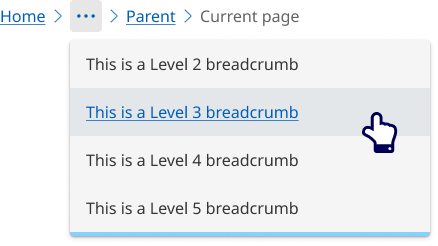
When page titles are long and complex, it is better to collapse links into an overflow menu. Interacting with the overflow menu still provides the access to location hierarchy. Using an overflow menu provides the best user experience by effectively managing space and keeping the interface clean and easy to navigate.
Breadcrumbs should never wrap onto a second line.
Breadcrumbs will collapse into an overflow menu when there is not enough room to display all levels of the breadcrumb list or there are more then 5 levels of breadcrumbs.
Mobile
For resolutions below 992px.

                <!-- Breadcrumb - Desktop -->
                <nav class="qld__breadcrumbs" aria-label="breadcrumb" data-path=".https://www.designsystem.qld.gov.au/?a=169317:dist/mysource_files/img/QLD-icons.svg" style="max-width: 951px;">
                <ol class="qld__breadcrumbs__list--desktop qld__link-list qld__link-list--inline" style="max-width: 951px;">

                        <li class="qld__breadcrumbs__item"><a href="" class="qld__breadcrumbs__link">Home</a>
                        </li>
                                <svg class="qld__icon" xmlns="http://www.w3.org/2000/svg"><use href="./?a=169317:dist/mysource_files/img/QLD-icons.svg#chevron-right"></use></svg>
                        <li class="qld__breadcrumbs__item"><a href="" class="qld__breadcrumbs__link">Level 2 Breadcrumb</a>
                        </li>
                                <svg class="qld__icon" xmlns="http://www.w3.org/2000/svg"><use href="./?a=169317:dist/mysource_files/img/QLD-icons.svg#chevron-right"></use></svg>
                        <li class="qld__breadcrumbs__item"><a href="" class="qld__breadcrumbs__link">Level 3 Breadcrumb</a>
                        </li>
                                <svg class="qld__icon" xmlns="http://www.w3.org/2000/svg"><use href="./?a=169317:dist/mysource_files/img/QLD-icons.svg#chevron-right"></use></svg>
                        <li class="qld__breadcrumbs__item"><a href="" class="qld__breadcrumbs__link">Parent page</a>
                        </li>
                                <svg class="qld__icon" xmlns="http://www.w3.org/2000/svg"><use href="./?a=169317:dist/mysource_files/img/QLD-icons.svg#chevron-right"></use></svg>
                        <li aria-current="page" class="qld__breadcrumbs__item">
                                Current page
                        </li>
                </ol>
                <!-- Breadcrumbs - Tablet -->
                <div class="qld__breadcrumbs__list--tablet qld__link-list qld__link-list--inline">
                        <div class="qld__breadcrumbs__item">
                                <svg class="qld__icon" xmlns="http://www.w3.org/2000/svg"><use href="./?a=169317:dist/mysource_files/img/QLD-icons.svg#chevron-left"></use></svg>
                                <a href="" class="qld__breadcrumbs__link">
                                        Parent page
                                </a>
                        </div>
                </div>
                <!-- Breadcrumbs - Mobile -->
                <div class="qld__breadcrumbs__list--mobile qld__link-list qld__link-list--inline">
                        <div class="qld__breadcrumbs__item">
                                <svg class="qld__icon" xmlns="http://www.w3.org/2000/svg"><use href="./?a=169317:dist/mysource_files/img/QLD-icons.svg#chevron-left"></use></svg>
                                <a href="" class="qld__breadcrumbs__link">
                                        Parent page
                                </a>
                        </div>
                </div>
                </nav>
Guidelines for usage
Breadcrumbs should be included on all pages except the home page for consistently across the site. They should always be placed at the top left of a page, before the main element. The breadcrumb should start with your ‘home’ page and end with the parent section of the current page. (GOV.UK, n.d.)
When to use
Use the breadcrumbs component when you need to help users understand and move between the multiple levels of a website or task.
When not to use
Don't use breadcrumbs for:
- Simple websites with flat structure: If your website has a simple hierarchy with a flat structure, breadcrumbs may not be necessary and could clutter the design
- Homepages: Breadcrumbs aren't needed on the homepage since users can easily return to it by clicking on the site logo or home button
How to use breadcrumbs
Do
- Display above the current page title (h1) in the content area
- Always start with Home for basic navigation structures.
- Each breadcrumb link should clearly describe the content of the page it leads to.
- Breadcrumbs should not be overly long or complex. Stick to the essential levels of the hierarchy.
Don't
- Shorten breadcrumb links if possible.
- Wrap over two lines. Instead, use the overflow menu if a full path can’t be shown.
- Use abbreviations or vague terms within breadcrumb links or page titles.