
Design
Input field anatomy
The anatomy of input fields in our Design System consists of several elements:
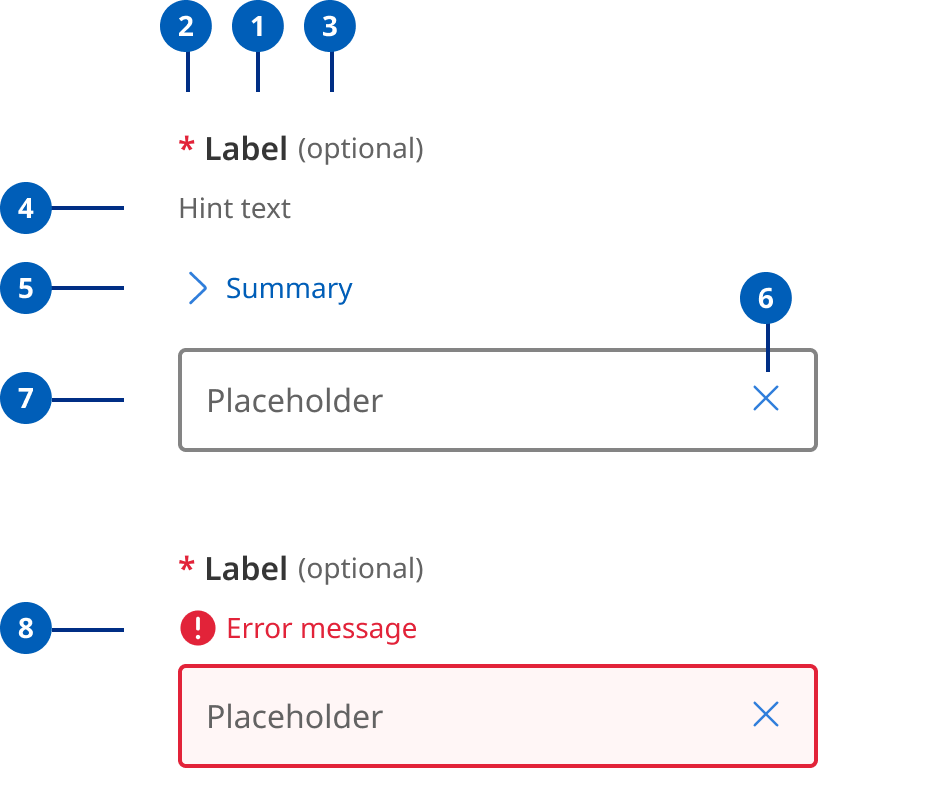
- Labels: Labels are headings that identify the purpose or context of the input field. For example, a label might say "First Name" to indicate that the user should enter their first name in the text field. Standard label alignment is left-aligned with the field underneath. Labels are mandatory on all fields with some exceptions such as search fields used in the header.
- Hint/Helper text: Helper text conveys additional guidance about the input field, such as how it will be used. It should only take up a single line and be persistently visible.
- Required field indicators: To indicate that a field is required, display an asterisk (*) next to the label text and mention at the start of the form that asterisks indicate required fields.
- Optional field indicators: Optional field indicators indicate that a field is optional. Clearly indicate optional fields by displaying the word ‘optional’ in parentheses next to the label text.
- Placeholder text: Hints at what goes into a field. Placeholder text is optional. It should always be avoided unless communicating complex formatting requirements.
- Trailing icons: Trailing icons are optional, they're often used to convey additional field functionality or options. This space should also be reserved to fit icons that some browsers might insert into the input (for example to show or generate a password) (UK.GOV n.d).
- Validation messages
- Error messages: When text input isn't accepted, an error message can display instructions on how to fix it. Error messages are displayed above the input line.
- Success messages: When text input is accepted, a message can display to the inform the user. This is useful in situations like password generation where you can let the user know their password has met syntax requirements.
Research and rationale
Like most of our components input fields started off using the DTA designs as a base, as our Design System progressed, we saw a need to include additional styles with less visual weight as well as to investigate this pattern as a whole to understand why other designs systems had diverged from the original DTA patterns.
For more information on our input text field design can be found in our forms component.